1. 스프링 시큐리티의 핵심 개념들 이해하기 2. 스프링 시큐리티의 주요 기능 중 하나인 Form Login 기반 인증 방식에 대해 알아보기
1. 스프링 시큐리티의 주요 개념과 특징
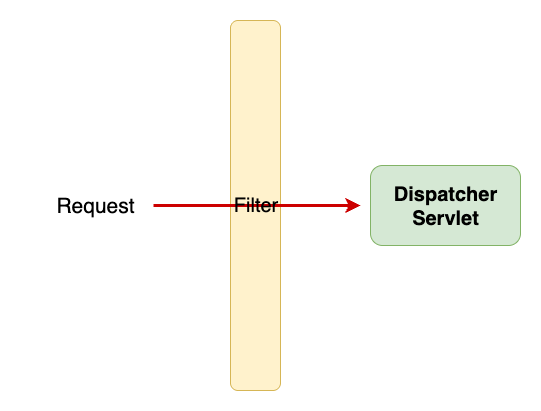
- 인증(Authentication) → 허가받은 사용자인지 확인 - 인가(Authoorization) → 어떤 권한이 있는지 확인 - 필터 기반 아키텍처 : 스프링 시큐리티는 “서블릿 필터” 기반으로 동작 → Spring Security는 FilterChainProxy를 통해서 상세로직을 구현
💡서블릿 필터
요청이 Dispatcher Servlet에 도착하기 전에 먼저 요청을 받아 필요한 작업을 하는 영역 → 여기서 여러 필터 체인을 통해 로그인 여부, 권한 여부, 토큰 유효성 등을 검사함
2. 스프링 시큐리티의 주요 기능
폼 로그인(Form Login): 기본 로그인 페이지 제공 (/login)
세션 관리(Session Management): 로그인하면 세션을 생성해 사용자를 추적
JWT 인증/인가: 토큰을 발급하고 요청 시 토큰을 검증
URL 접근 제한: "/admin/**"는 ADMIN 권한만 접근 가능하도록 설정
CSRF(Cross-Site Request Forgery) 방어
비밀번호 암호화: BCryptPasswordEncoder 같은 해시 함수 제공
3. Form Login 기반 인증
URL 요청이 들어왔을 때 인증이 되지 않았다면 로그인 페이지를 반환하는 형태
📌 동작 흐름
사용자가 /login 페이지에서 아이디, 비밀번호 입력 후 POST 요청
요청이 Spring Security Filter Chain을 통과.
UsernamePasswordAuthenticationFilter가 요청을 가로챔 -> 인증된 사용자의 정보가 담기는 인증 객체인 Authentication의 종류 중 하나인 UsernamePasswordAuthenticationToken을 만들어 폼에서 보내는 username과 password를 AuthenticationManager에게 넘겨 인증을 시도
💡UsernamePasswordAuthenticationToken Authentication을 implements한 AbstractAuthenticationToken의 하위 클래스로, 인증객체를 만드는데 사용된다.
인증 성공 시:
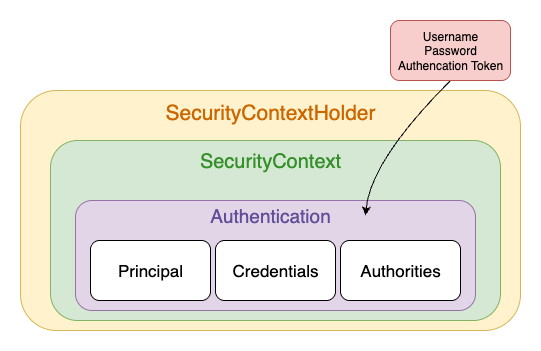
SecurityContextHolder를 통해 SecurityContext에 인증 객체(Authentication 객체) 저장
HTTP 세션(Session) 생성
기본적으로 / (루트) 페이지로 리다이렉트
인증 실패 시:
SecurityContextHolder를 비움
/login?error 페이지로 리다이렉트
실패 이유를 세션 속에 저장해 로그인 페이지에서 표시 가능
💡Authentication - 현재 인증된 사용자를 나타내며 SecurityContext에서 가져올 수 있다. - principal : 사용자를 식별 * Username/Password 방식으로 인증할 때 일반적으로 UserDetails 인스턴스를 사용 - credentials : 주로 비밀번호, 대부분 사용자 인증에 사용한 후 비워줌 - authorities : 사용자에게 부여한 권한을 GrantedAuthority로 추상화하여 사용
💡UserDetails - 사용자 정보의 표준 인터페이스(스프링 시큐리티가 인증/인가 과정에서 사용할 사용자 정보) - UsernamePasswordAuthencationToken타입의 Authentication을 만들 때 사용
스프링 시큐리티 인증 설정 예시
// 예시코드
//securitContextHolder를 통해 SecurityContext를 만든다.
SecurityContext context = SecurityContextHolder.createEmptyContext();

//인증객체(Authentication) 만들기 -> 구현객체인 UsernamePasswordAuthenticationToken으로 만듦
Authentication authentication = new UsernamePasswordAuthenticationToken(principal, credentials, authorities);
context.setAuthentication(authentication); // SecurityContext 에 인증 객체 Authentication 를 저장합니다.

//Authentication이 담긴 SecurityContext를 SecurityContextHolder에 담는다.
SecurityContextHolder.setContext(context);
참고) 권한 부여 예시
<UserDetails>
@Override
public Collection<? extends GrantedAuthority> getAuthorities() {
	UserRoleEnum role = user.getRole();
	String authority = role.getAuthority();

	SimpleGrantedAuthority simpleGrantedAuthority = new SimpleGrantedAuthority(authority);
	Collection<GrantedAuthority> authorities = new ArrayList<>();
	authorities.add(simpleGrantedAuthority);

	return authorities;
}
Authentication authentication = new UsernamePasswordAuthenticationToken(userDetails, null, userDetails.getAuthorities());
오늘의 코멘트
스프링 시큐리티 내에서 사용할 수 있는 기능들이 너무 많아서 어떻게 구현해야 하는지 감을 잡기가 쉽지 않았는데, 먼저 각 기능들에 대한 이해, 인증 인가가 이루어지는 매커니즘, 인증 인가시 필요한 객체들에 대한 이해를 먼저 하고, 어떤 기능을 구현하려면 어떤 방법을 써야하는지, 어떤 절차로 이루어져야하는지 직접 고민해보면서 공부를 해야한다는 것을 꺠달았다.